
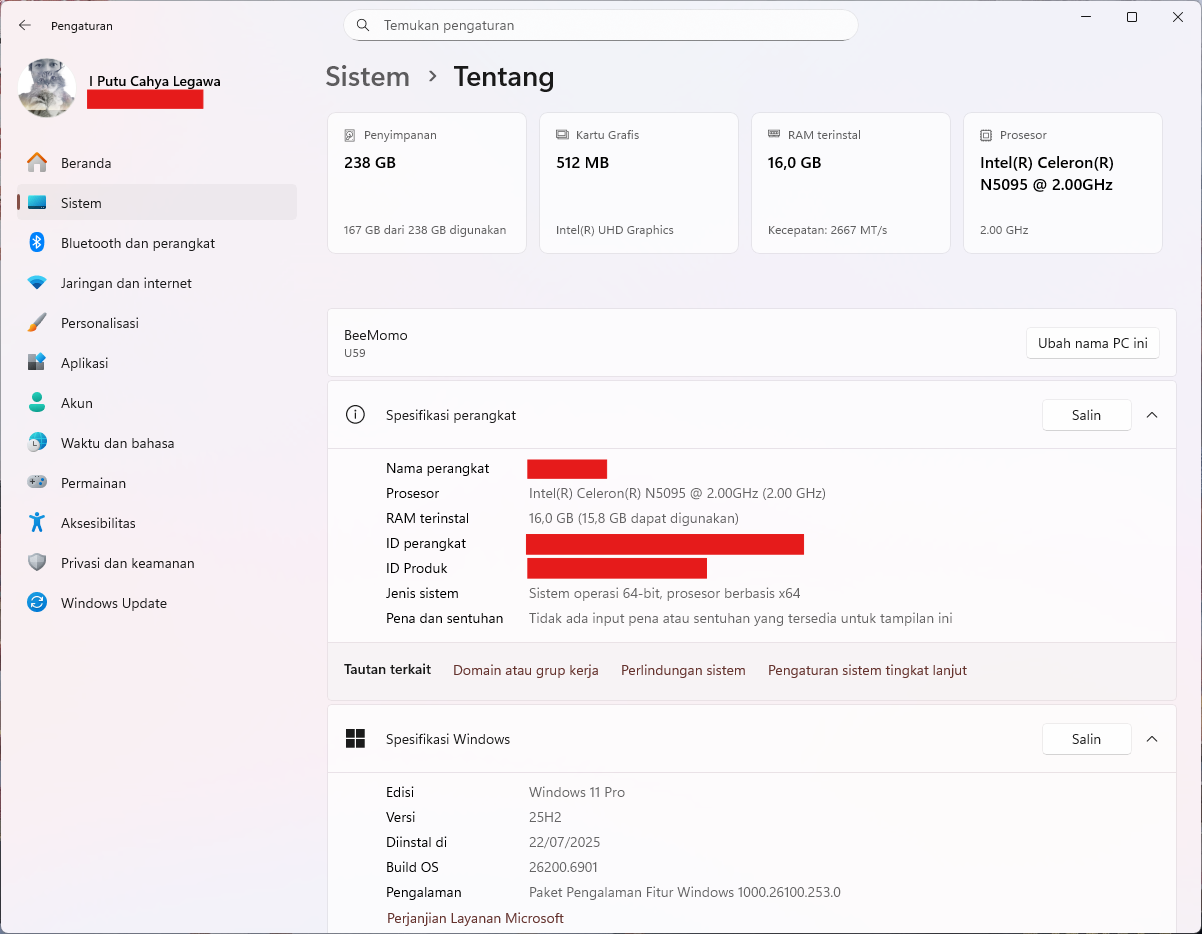
For years, I believed you needed a powerful, expensive computer to be productive. As someone who writes, creates presentations, manages data in Excel, and browses the web, I thought a hefty machine was a necessity. Then, I took a chance on a budget mini PC—the AZW U59 from Beelink, a small box with an Intel Celeron N5095 processor that cost me just over $200.
Spoiler alert: It’s been more than enough. But it’s not without its quirks and limitations. If you’re considering a similar path, here’s my real-world experience.
The Good: Where This Tiny Powerhouse Shines
For my core tasks, this machine doesn’t just cope; it excels.
- Writing and Office Work (Word, PowerPoint, Excel): This is the mini PC’s sweet spot. Applications like Microsoft Office open instantly and run without a hint of lag. With 16GB of RAM—a generous amount for this class of device—I can have a dozen browser tabs open for research, my document, a PowerPoint file, and Spotify running in the background, all without the system breaking a sweat. The experience is fluid and completely frustration-free.
- Web Browsing: With the 16GB RAM, browsing is a breeze. I use Microsoft Edge with multiple tabs open, including resource-heavy web apps like Google Docs and Notion. The pages load quickly, and switching between tabs is instantaneous. It handles modern web browsing far better than many more expensive laptops with only 8GB of RAM.
- Watching FHD Video: Whether it’s YouTube, Netflix, or local 1080p movie files, the integrated Intel UHD Graphics decodes them flawlessly. The video playback is smooth, and the processor barely breaks a sweat, often sitting at under 10% usage. I’ve even connected it to my TV for movie nights without a single stutter.
- Retro Gaming: This is where it gets fun. I occasionally dive back into the classics from the 90s and early 2000s—games like StarCraft, Age of Empires II, Half-Life, and Diablo II. The Celeron N5095 and its GPU are more than capable of handling these titles at full HD, often with room to spare for upscaling or mods. It’s a perfect little retro gaming box.
The “It’s-Complicated”: Limitations and Future Headaches
This isn’t a perfect machine. You have to be aware of its constraints and the maintenance it requires.
- The Storage Squeeze is Real. My model came with a 256GB SSD. After Windows, essential programs, and a few projects, my main C: drive is down to just 57GB of free space. This is my biggest problem.
- The Issue: When your system drive gets this full, Windows starts to slow down. Updates can fail, and the system can become unstable.
- My Solution: I’ve become a storage minimalist. I use Google Drive and OneDrive for Desktop to offload older files to the cloud and am ruthless about uninstalling programs I don’t use. My next upgrade will absolutely be a larger SSD.
- It Has a Performance Ceiling (And It’s Low). The Intel Celeron N5095 is an entry-level chip.
- The Issue: Try to edit a 4K video, run a complex simulation in Excel, or play a modern game, and you’ll hit a wall. It’s just not built for that. Even with dozens of browser tabs, if one of them is running a heavy web app, you might notice a pause.
- My Solution: I know my machine’s limits. I work within them. For my needs, the ceiling is high enough, but I would never recommend this PC to a content creator or a gamer.
- You Become Your Own IT Department. Budget PCs often have outdated drivers. My system report showed my Intel graphics drivers were from June 2023.
- The Issue: Outdated drivers can lead to security vulnerabilities, minor bugs, and missed performance optimizations.
- My Solution: I make it a habit to manually check for driver updates every few months from the manufacturer’s website. It’s a small price to pay for stability.
- No Future-Proofing. This PC is what it is. I can’t upgrade the processor or the graphics card. My only upgrade paths are RAM (which is already great) and storage. As software becomes more demanding, this machine will feel slower sooner than a high-end desktop would.
The Verdict: Who Should (and Shouldn’t) Buy a PC Like This?
This machine is perfect for you if:
- You are a student, writer, or office worker whose tasks are based in browsers and office suites.
- You want a quiet, energy-efficient, and incredibly small PC for your living room or a minimalist desk.
- You’re on a very tight budget but need reliable performance for everyday computing.
Look elsewhere if:
- You edit videos, work with large RAW photos, or use CAD software.
- You play anything other than indie games or titles from a decade ago.
- The idea of managing your storage space and drivers sounds annoying.
Final Thoughts
My Beelink AZW U59 mini PC has been a revelation. It proved that for a huge segment of computer users, the pursuit of ever-more-powerful hardware is often unnecessary. For writing, presentations, spreadsheets, and web browsing, this affordable, pint-sized computer isn’t just “good enough”—it’s genuinely excellent.
You just need to go in with the right expectations, be willing to perform a little basic maintenance, and embrace the art of digital minimalism. For me, it’s been the perfect digital companion.
What about you? Are you using a budget machine for your daily tasks? Share your experiences in the comments!

 Bhyllabus l'énigme
Tinggalkan komentar